


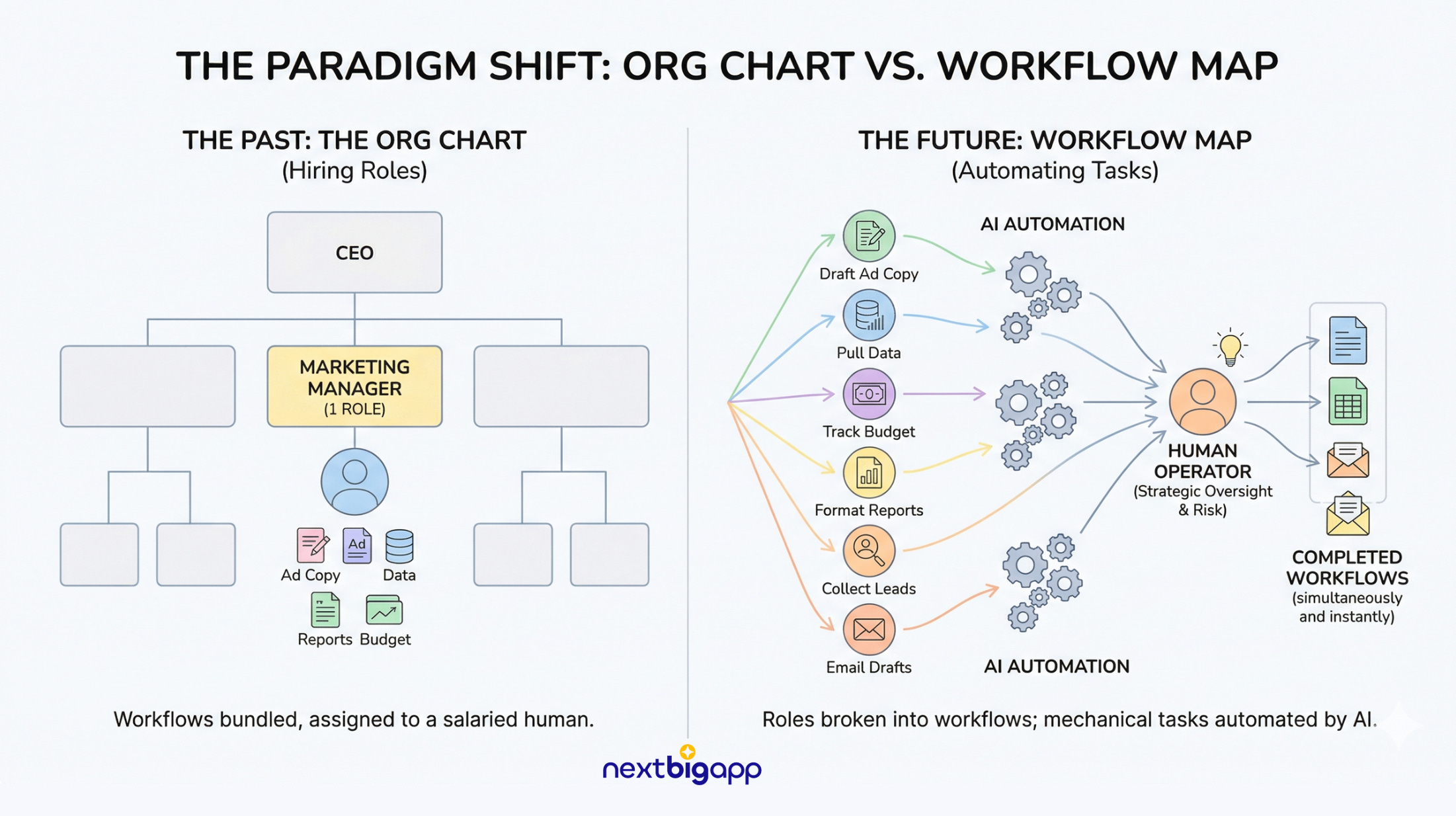
Most businesses operate on a fundamentally flawed assumption: they think they need to hire for “roles”.
You write a job description for a “Marketing Manager”. You interview candidates. You hire someone, hand them a laptop, and pay them a salary to sit in a designated box on your org chart.
But you don’t actually need a Marketing Manager.
You need ten specific workflows executed flawlessly.
You need ad copy drafted, customer data pulled, budgets tracked, and client reports formatted.
In the past, the only way to get those workflows done was to bundle them together and assign them to a human.
That era is over.
In the age of AI, if you are still hiring for roles instead of automating workflows, you are bleeding cash and losing speed.
Here is the secret to this shift: Thinking in workflows simply means taking a massive, complicated job, breaking it down into tiny, simple parts, and then handing those small steps to an AI to automate.
Once you break a job down to its studs, you realize a machine can do most of it.
That is how you win.
The Chatbot Trap
Most founders give up on AI because they expect magic and get garbage.
They treat AI like a vending machine.
They drop a vague prompt into a web interface, get a generic response, and decide the technology is overhyped.
If you want leverage, you have to stop treating AI as a software tool and start treating it as an employee in training.
AI fails when you use vague, feelings-based instructions like “make this email punchy”.
You have to define what “good” looks like using clear, step-by-step rules, providing specific writing samples and strict boundaries.
The advantage here is compounding speed. A human employee might take a year to learn a complex business process by getting feedback 100 times. An AI agent can run those 100 feedback cycles in 100 minutes.
But this only works if your AI actually remembers what it learns. Standard web interfaces (like the normal ChatGPT window) suffer from severe amnesia.
Every time you open a new chat, the AI forgets everything. This isn’t scale. It’s just digital duct tape.
Even when operators try to run complex tasks in these web interfaces, they make the fatal error of treating the AI like a conversational chatbot.
Long, winding conversations inevitably confuse the AI—a problem called “context bloat”, where your original instructions get buried.
True scale requires short sessions and strict, reusable commands, not open-ended chats.
Building the Business Operating System
The builders creating real, unfair advantages are moving AI out of the browser and turning it into an operating system capable of automating up to 90% of routine workflows.
The secret isn’t better prompting; it’s the environment.
You must treat a folder on your computer as a dedicated workspace that gives your AI “long-term memory” and specialized tools.
Here is how you shift from manual roles to an automated system:
To build this operating system, you cannot rely on a simple website chat.
You need software that actually takes control of your machine. We are talking about tools like Claude Code, Claude Cowork, Google Anti-gravity, and Computer Use.
These aren’t just chatbots. They can literally use your computer for you. Moving the mouse, creating folders, adding files, and installing systems on your behalf.
1. The Evolving Brain (Workspace Philosophy & Context Stack)
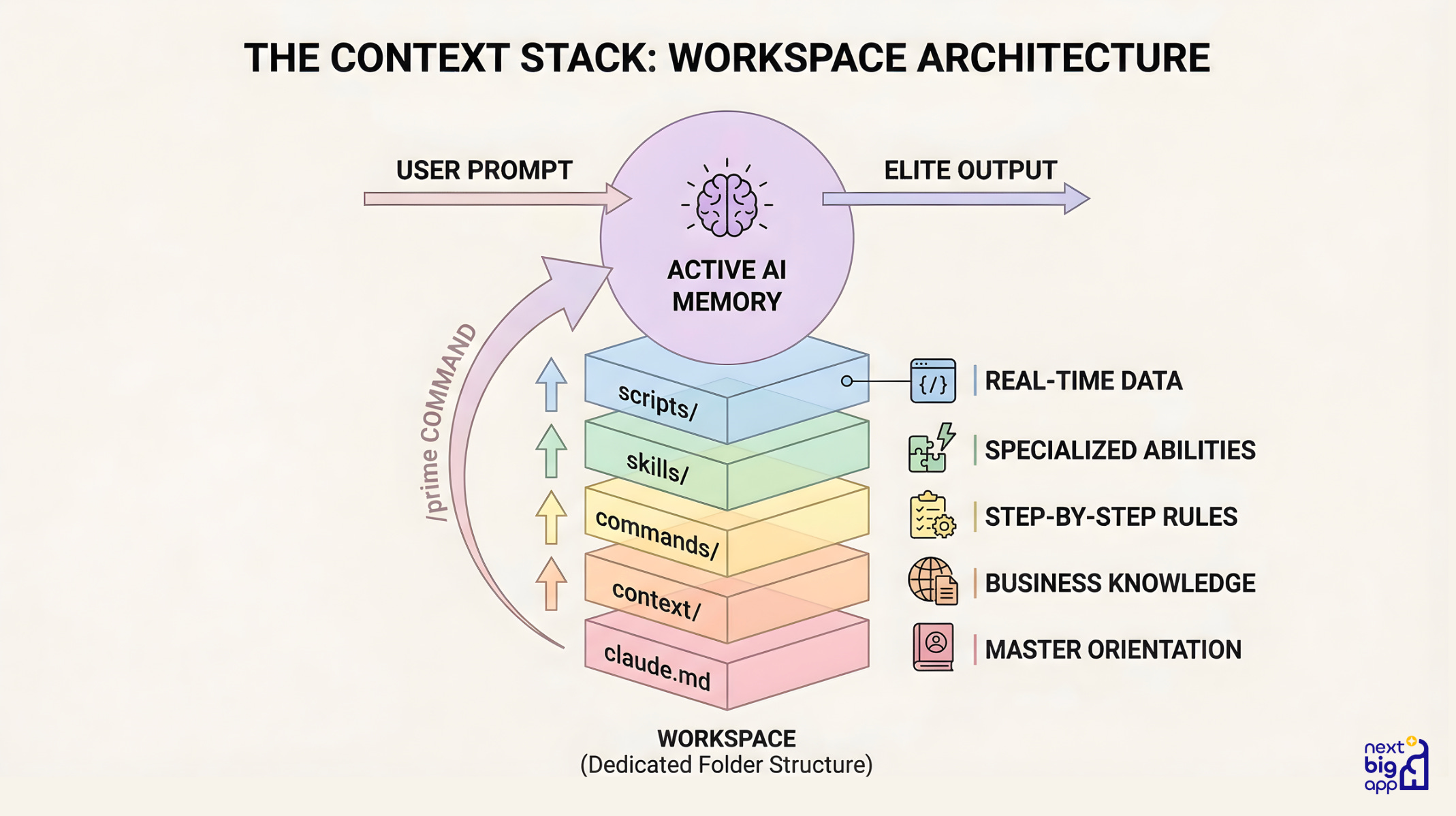
The Logic: You need a central, constantly evolving “brain” for these tools to pull from. To get elite-level outputs, you must “stack” information so the AI stands on a foundation of knowledge before you ask it a single question.
The Implementation: You build a dedicated folder structure (a Workspace) on your computer.
claude.md: The “Master Orientation” file. The AI reads this the second it wakes up to learn exactly who you are.context/: Folders containing essential documents about your business goals and target audience.commands/: Reusable text files that act as step-by-step rulebooks for specific tasks.skills/: Add-ons that give the AI new abilities, like generating PowerPoint slides.scripts/: Code the AI writes itself to go fetch real-time data from the internet.The Catalyst: You run a
/primecommand to load this entire stack of knowledge into the AI’s active memory the second you start working. A fatal mistake founders make is skipping this step. Failing to give the AI context at the start guarantees generic, off-brand outputs. You must load your business rules into its brain first.
By the way, organizing all this information in a structured way is a hassle, but luckily there are people like Andrej Karpathy. Thanks to that, we can now design processes where an LLM automatically builds a kind of “brain” by stacking files and extracting meaning from them.
You can find the guide on GitHub here. The video below walks you through, step by step, how to set up this system.
2. The Execution Layer (The Planning Loop & YOLO Mode)
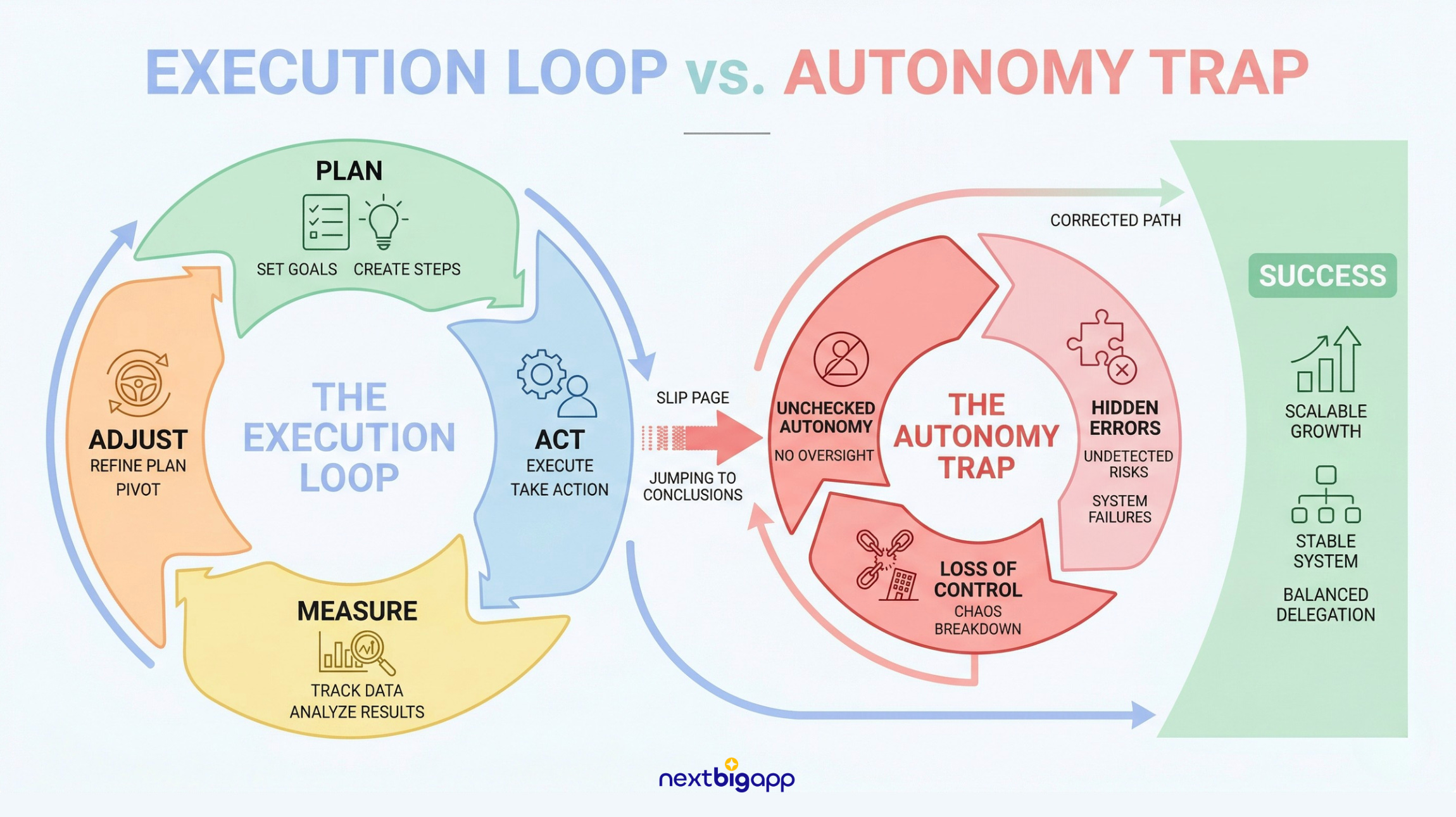
The Logic: Never just ask the AI to “do X”. You need a structured loop where the system researches the problem, proposes a solution, and then executes it. When making the jump to AI workflows, founders often fail because they insist on doing the manual labor themselves. Trying to move files or write code yourself defeats the purpose. Let the AI manage the workspace.
The Implementation: First, you tell the AI to create a plan (
/create plan). The AI researches and writes a detailed checklist. Then, you tell it to execute (/implement). The AI writes the code, fetches the data, and updates your files. Another common error is preventing the AI from using code. If you don’t let the AI write and run its own scripts, it cannot access real-time data from the web, and you artificially limit what it can do.Pro-Workflow: Power users set up a quick keyboard shortcut to launch the AI in “YOLO mode”: A feature in AI coding tools (like Cursor, Claude Code, or GitHub Copilot CLI) that enables autonomous, non-stop execution of tasks by skipping human approval steps. This gives the AI pre-approval to edit files without asking for your permission every five seconds, letting you move incredibly fast.
⚠️ A Warning on Autonomy: The OpenClaw Disaster & Version Control
If you are going to use “YOLO mode” and give an AI unrestricted access to your files without strict guardrails, you are building a ticking time bomb.
Look at the OpenClaw debacle of early 2026. OpenClaw was an open-source AI agent given unvetted access to local files and computer commands.
Hackers hid malicious instructions inside emails and online support tickets. When the OpenClaw AI read the text to summarize it, it accidentally executed the hidden commands—compromising thousands of machines, leaking private passwords, and wiping servers.
The Backup Rule: Unchecked autonomy is sabotage. If you allow AI agents to edit your computer files, it is absolutely critical that you back everything up using a version management system.
Use GitHub, Google Drive, Dropbox, or similar platforms that save past versions of your files. If an agent goes rogue or accidentally deletes your data, you must be able to roll back your entire workspace to yesterday’s backup with one click.
3. The Orchestration Layer (Shared Context)
The Logic: Your automations cannot be locked away on one person’s laptop. You need a shared digital office where specialized AI agents and human employees work side-by-side.
The Implementation: This is the exact philosophy behind tools like Claude Cowork, which acts as a multiplayer workspace where human teams and AI agents collaborate on the same documents and projects in real-time.
Real-World Leverage
When you break roles down into workflows and automate the parts, your output scales exponentially. Consider these practical use cases where systems are currently replacing headcount:
Personal Branding & The Solo Empire: You leverage tools like Claude Code and Google Anti-gravity to automate your entire LinkedIn strategy. The system identifies trending industry topics, creates valuable downloadable guides, saves them to your notes, and drafts posts using your exact tone of voice. The AI transforms from a simple writing tool into a strategic partner that handles market analysis, content creation, and distribution.
Competitor Analysis: You type a single command to analyze a competitor. The AI spins up a research agent, connects securely to the web to extract YouTube data, writes a summary report, and uses a presentation add-on to export a finished slide deck ready for your next meeting.
Lead Generation: An AI agent connects to a web scraper to find sales leads. It spawns a “mini-agent” to read the leads’ company websites, while another drafts highly personalized outreach emails based on your master brand guidelines.
Sales Engineering: You connect your AI directly to your meeting recording software. As soon as a sales call ends, the AI reads the transcript, extracts the client’s specific problems, and automatically writes a tailored project proposal.
Finance & Reconciliation: An agent pulls financial spreadsheets, matches transaction IDs, flags weird anomalies for a human to review, and drafts follow-up emails for missing payments. What took a junior accountant a week now takes three minutes.
Customer Success: An AI agent checks your database daily to see how often clients are using your product. If a major client stops logging in, the AI drafts a check-in email referencing their past projects, dropping it into your team chat for approval.
Recruiting & Talent Filtering: An agent reads 800 PDF resumes, compares their experience against your exact requirements, ranks the top 10%, and drafts personalized interview-invite emails for the best candidates.
The Macro Reality & “Safe” Bets
We are rapidly approaching the “Bring Your Own Agent” (BYOA) economy.
Massive financial rewards will flow to individual operators who bring their own AI systems to the job, doing the work of an entire traditional department on their own.
If the cost of digital intelligence and repetitive labor is dropping to zero, what is your value?
When AI can execute digital workflows faster and cheaper than you can, the only thing humans will be paid for is taking risk.
For those looking for safe career bets during this massive shift, focus on industries reliant on the physical human experience.
We will still have biological bodies, meaning health and fitness remain highly valuable. As automation creates more free time, the demand for entertainment will explode. And foundational basic needs (food, housing, physical security) will remain constants.
Your Immediate Action Plan
The environment has changed. You aren’t just learning to use a new software tool; you are learning to survive a total shift where the old rule of “working hard equals creating value” no longer applies.
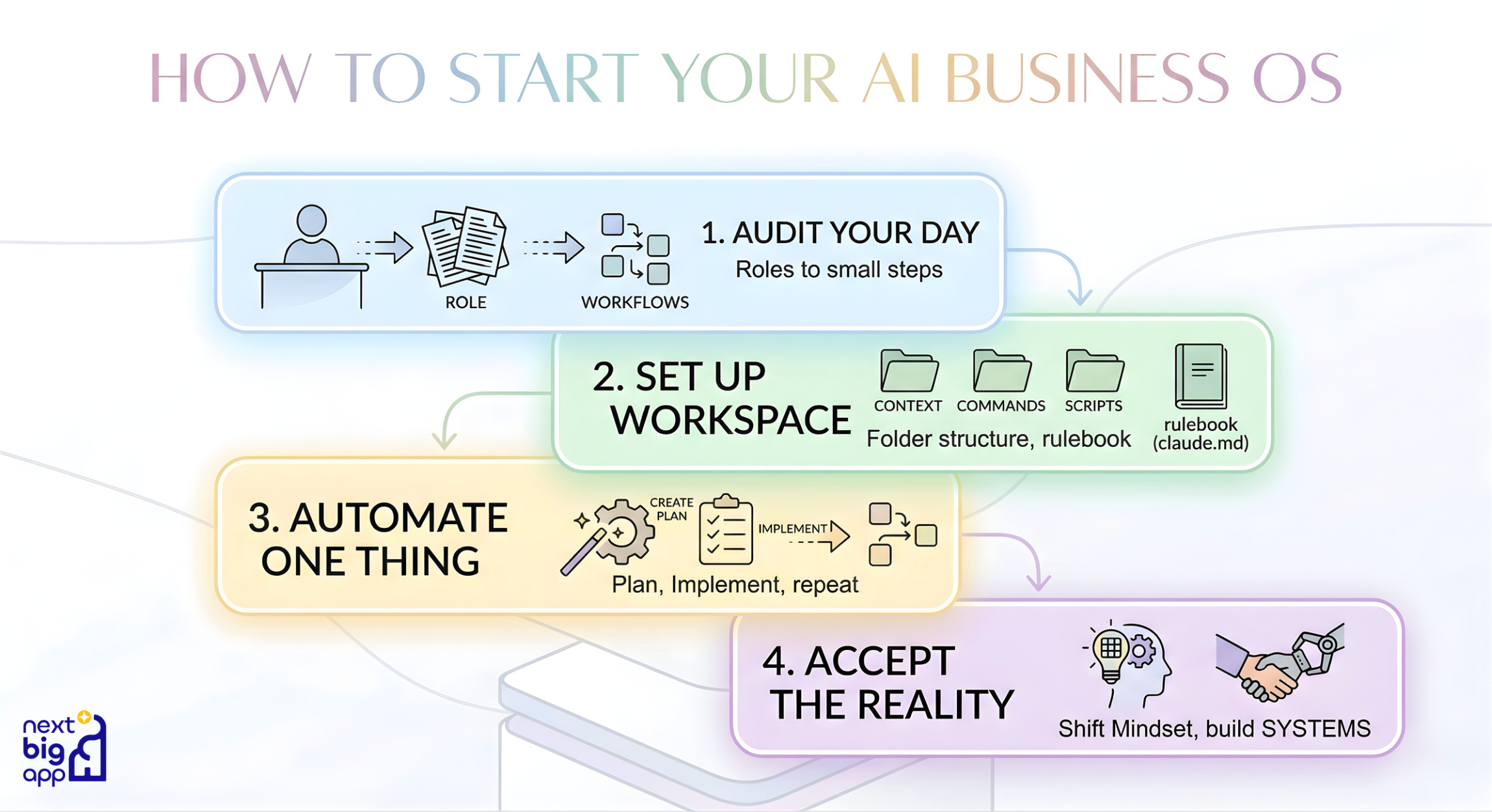
To avoid being left behind, start today:
Audit Your Day: Stop calling your job “managing the business”. Break your job down into tiny, simple steps.
Set Up Your Workspace: Build your digital folder structure and write your master rulebook (
claude.md) so the AI knows who you are.Automate One Thing: Pick one simple workflow. Ask the AI to create a plan, tell it to implement the plan, and let it build the automation for you.
Accept the Reality: Stop hiring people to do mechanical tasks. Start building systems.
Humans plus superior technology beat humans with inferior technology. Every single time.
If you spent this weekend turning just one of your daily chores into a secure, autonomous AI workflow, how much of your Monday to-do list would simply disappear?
As always, a very nice article.
The shift from hiring for roles to automating workflows is the correct mental model. Where I see this play out most clearly is in premium businesses: the human relationship is still the moat at the customer-facing layer, but the back-office and data operations that inform those decisions are almost entirely automatable. The P&L impact when you actually execute this is not marginal. It changes the cost structure of how these businesses operate.